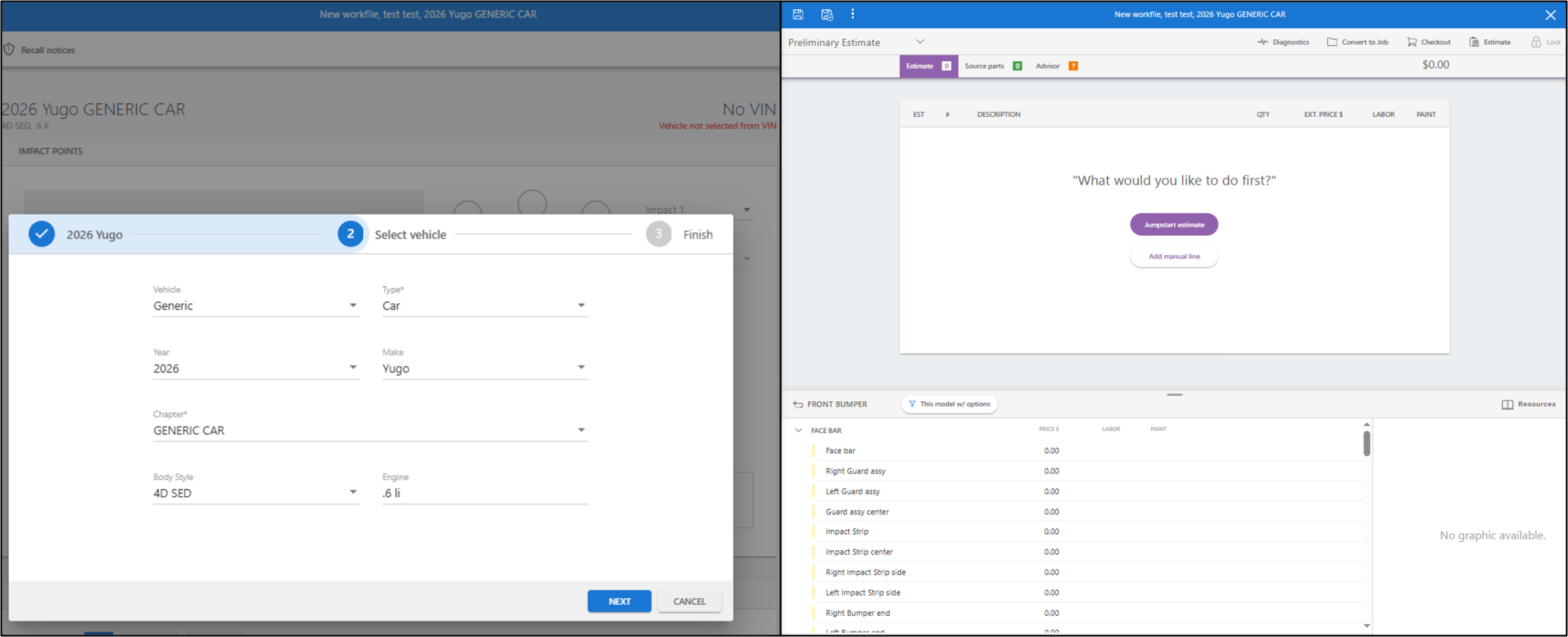
When writing estimates or repair plans for vehicles that do not decode in the CCC database (such as classic, specialty, or heavy-equipment vehicles), you can use the Generic database.
This populates familiar, standardized part categories and descriptions, keeping your line items clean and consistent—though you will still need to manually input part numbers, pricing, and labor times.
Setup Steps:
- Do not enter a VIN. Entering a non-decoding VIN can lock or restrict manual selection fields.
- Under the vehicle selection screen, choose Generic from the vehicle list.
- Select the vehicle Type and Year from the dropdown menus.
- (Optional) Select the Make if listed, or leave it blank along with the Body Style and Engine fields.
- Proceed to the estimate screen.
Once inside the estimate, you will have standard vehicle part groupings available to start selecting operations and building your repair plan as usual.